Mastering Cosplay Photo Editing: Create Stunning 3D Backgrounds with Blender & Photoshop
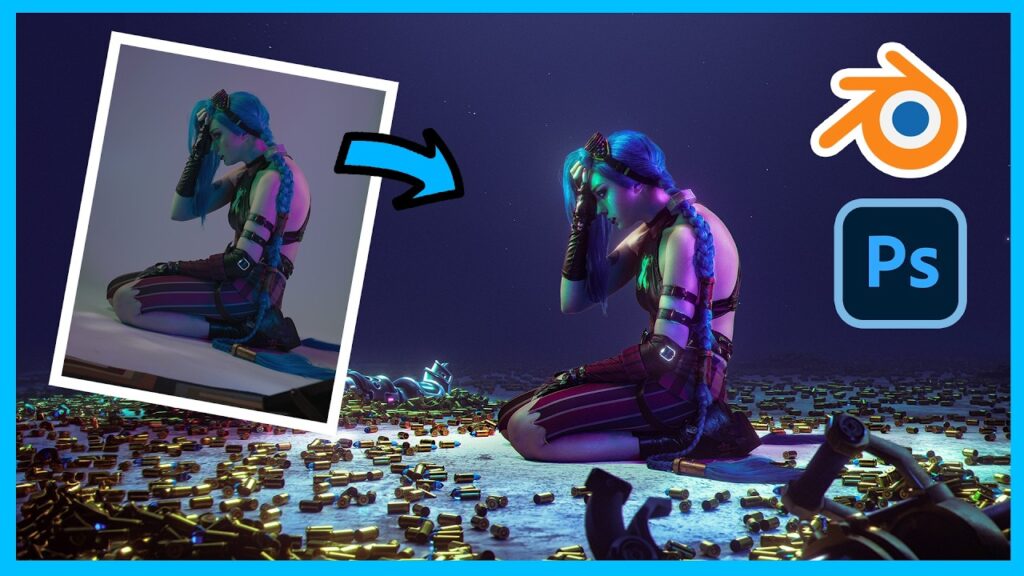
This long-form tutorial from Ansen Studios shows how to place a cosplay portrait inside a 3D environment built in Blender, then blend everything in Photoshop. Project files are offered for free so you can follow along.
What you will learn
- Cropping, framing and skin retouching
- Why dodge and burn matters for a three-dimensional look
- Precise subject selection
- Setting up a 3D camera in Blender and matching the photo’s perspective
- Compositing the render and the portrait into one image
Related reading
Matching perspective is the same problem 3D photographers face when aligning layers. Our 3D post-processing guide covers the wider workflow.