Best Depth Editing Software for 3D Photos
In the realm of digital content creation, 3D visuals have become pivotal in industries ranging from film and gaming to architecture and virtual reality.
In the realm of digital content creation, 3D visuals have become pivotal in industries ranging from film and gaming to architecture and virtual reality. Producing stunning 3D visuals requires not only creative vision but also the right tools to bring those ideas to life. This article explores the top depth editing software available today, guiding you through the features that make each a standout choice for creating captivating 3D content.
Blender: The Open-Source Powerhouse
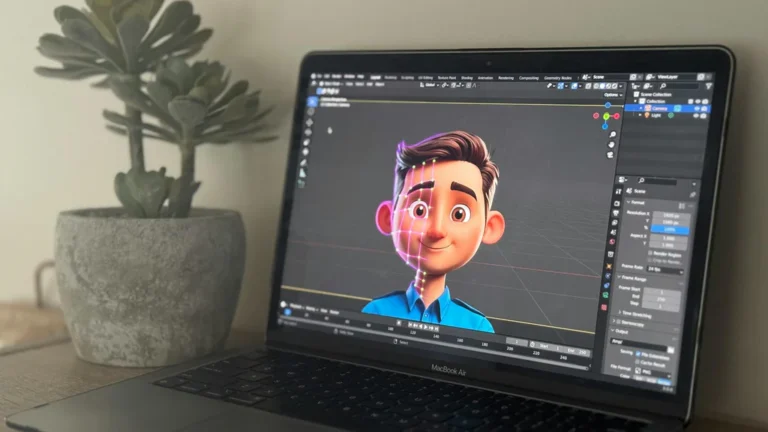
Blender is a free and open-source 3D creation suite that has gained a formidable reputation in the industry. Its comprehensive suite of tools includes modeling, rigging, animation, simulation, rendering, compositing, and motion tracking. Blender’s versatility makes it suitable for both amateurs and professionals.
Key Features
- **Modeling Tools**: Blender offers a robust set of modeling tools including sculpting, retopology, and UV mapping.
- **Animation and Rigging**: The software supports advanced rigging tools, allowing for fluid and realistic animations.
- **Rendering**: With its integrated Cycles render engine, Blender provides photorealistic rendering capabilities.
- **Community and Add-ons**: Being open-source, Blender has a large community contributing to a vast array of plug-ins and add-ons.
Pros and Cons
- **Pros**: Cost-effective, highly customizable, extensive community support.
- **Cons**: Steep learning curve, interface can be overwhelming for beginners.
Autodesk Maya: Industry Standard for Animation
Autodesk Maya is often hailed as the industry standard for 3D animation and modeling. It is widely used in film production, television, and video game development due to its powerful rendering and animation features.
Key Features
- **Comprehensive Toolset**: Maya provides high-end character and effects toolsets that are essential for creating complex animations and simulations.
- **Rendering**: The software supports multiple renderers including the native Arnold renderer for high-quality outputs.
- **Integration**: Maya integrates well with other Autodesk products and supports a wide range of file formats.
- **Customization**: Users can create scripts and plug-ins to enhance workflows using MEL and Python.
Pros and Cons
- **Pros**: Extensive toolset, industry-standard, great for character animation.
- **Cons**: Expensive, requires a powerful hardware setup.
Unity: Real-Time 3D Development
Unity is a real-time 3D development platform that is popular in game development but increasingly used for other 3D applications like architecture and interactive experiences.
Key Features
- **Real-Time Rendering**: Unity allows creators to see changes in real-time, which is crucial for gaming and interactive content.
- **Cross-Platform Support**: It supports multiple platforms, including mobile, desktop, VR, and AR.
- **Asset Store**: Unity’s Asset Store offers a plethora of assets, plug-ins, and integrations to speed up development processes.
- **Scripting**: Unity uses C# for scripting, providing powerful capabilities for creating interactive content.
Pros and Cons
- **Pros**: User-friendly, excellent for real-time applications, extensive asset store.
- **Cons**: Can be limited in visual fidelity compared to pre-rendered graphics engines.
Unreal Engine: High-Fidelity Real-Time Rendering
Unreal Engine, developed by Epic Games, is renowned for its stunning graphics and real-time capabilities. It is widely used in both game development and cinematic productions.
Key Features
- **Visual Fidelity**: Unreal Engine is known for its high-quality graphics and realistic lighting, thanks to its powerful rendering engine.
- **Blueprints**: A visual scripting system that allows users to create game logic without extensive programming knowledge.
- **Marketplace**: Similar to Unity, Unreal Engine offers a marketplace with a wide range of assets and tools.
- **Cross-Platform**: Supports numerous platforms, making it versatile for various types of 3D projects.
Pros and Cons
- **Pros**: Superior graphics, vast feature set, free to use with royalty terms.
- **Cons**: Can be resource-intensive, steeper learning curve for beginners.
Cinema 4D: The Motion Graphics Maestro
Cinema 4D, developed by Maxon, is highly regarded for its ease of use and powerful tools specifically tailored for motion graphics. It’s a favorite among designers for creating broadcast graphics, commercials, and other dynamic visuals.
Key Features
- **Intuitive Interface**: Known for its user-friendly interface, making it accessible for beginners.
- **MoGraph Toolset**: A robust set of tools for motion graphics artists, allowing for the creation of complex animations with ease.
- **Integration**: Excellent integration with Adobe After Effects, making it a staple for motion graphics professionals.
- **Rendering**: Offers powerful rendering options with support for third-party renderers.
Pros and Cons
- **Pros**: Intuitive interface, excellent for motion graphics, strong community support.
- **Cons**: Can be expensive, limited in some advanced 3D modeling capabilities compared to others.
ZBrush: The Sculptor’s Choice
ZBrush, developed by Pixologic, is the go-to software for digital sculpting. It is widely used in character modeling and design due to its powerful sculpting tools.
Key Features
- **Sculpting Tools**: ZBrush offers an unparalleled set of sculpting tools, allowing artists to create detailed and intricate models.
- **Polypaint**: Enables artists to paint directly on the surface of models without the need for UVs.
- **Dynamesh**: Allows for dynamic topology, which aids in creating complex models without worrying about the underlying mesh structure.
- **ZRemesher**: Automatically retopologizes models to create cleaner meshes for further detailing.
Pros and Cons
- **Pros**: Powerful sculpting capabilities, intuitive interface for sculptors.
- **Cons**: Limited in animation and rendering capabilities, can be challenging for beginners.
Conclusion
Choosing the right 3D editing software depends largely on your specific needs and the type of projects you intend to work on. Whether you’re looking for an all-encompassing tool like Blender, aiming for high-end animation with Maya, or focusing on real-time applications with Unity or Unreal Engine, each of these software packages offers unique strengths and capabilities. By understanding the features and limitations of each, you can make an informed decision that aligns with your creative vision and technical requirements.