Best Photogrammetry Software for 3D Models
Photogrammetry has revolutionized the way we create 3D models, offering unprecedented accuracy and efficiency.
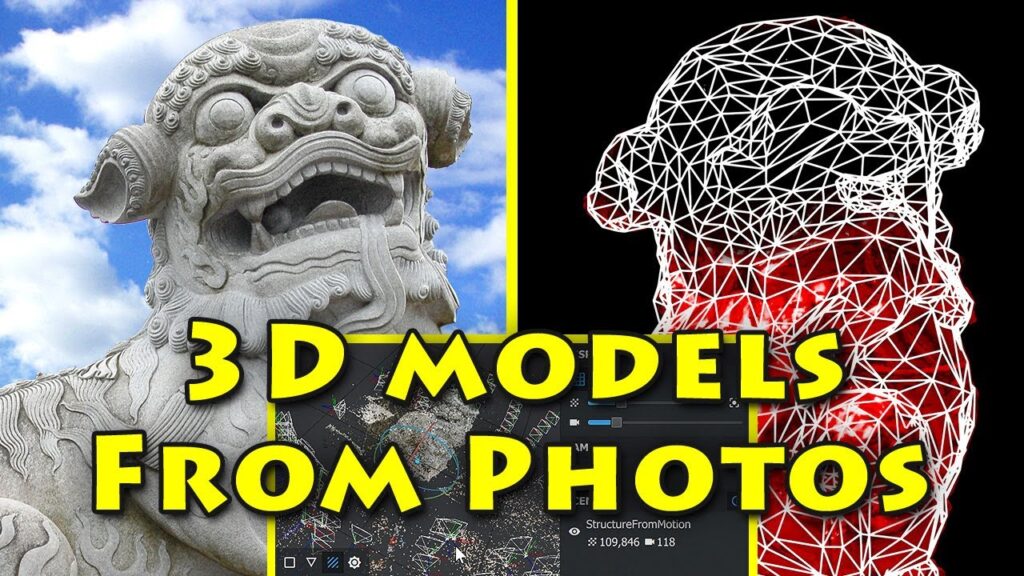
Photogrammetry has revolutionized the way we create 3D models, offering unprecedented accuracy and efficiency. As the demand for high-quality 3D representations grows, so does the need for powerful photogrammetry software that can transform images into stunning 3D models. This article delves into the top photogrammetry software available today, highlighting their features, capabilities, and unique advantages.
Understanding Photogrammetry
Photogrammetry is the science of making measurements from photographs, particularly for recovering the exact positions of surface points. It involves capturing multiple images of an object or landscape from different angles and processing them to generate detailed 3D models. This technique is widely used in various fields, including architecture, archaeology, engineering, and film production, due to its ability to produce highly accurate and detailed models.
Key Features to Look for in Photogrammetry Software
When selecting photogrammetry software, it’s essential to consider several key features that can significantly impact your workflow and the quality of your models:
User-Friendliness
Intuitive interfaces and easy-to-navigate tools are crucial, especially for beginners. The software should allow users to import images, process data, and generate models without a steep learning curve.
Processing Speed and Efficiency
High processing speed is vital for handling large datasets and producing results quickly. Efficient software should optimize computational resources and support parallel processing to enhance performance.
Accuracy and Detail
The software should offer high precision in creating 3D models, capturing intricate details and textures accurately. This is particularly important in fields like archaeology and engineering, where precision is paramount.
Compatibility and Integration
Compatibility with various file formats and seamless integration with other tools and platforms can streamline workflows and improve productivity. The software should support common 3D file formats like OBJ, FBX, and STL.
Cost and Licensing
Budget considerations are essential, especially for small businesses and individual users. Some software offers free versions or flexible licensing options, catering to different financial constraints.
Top Photogrammetry Software
Here are some of the leading photogrammetry software options available today, each with unique strengths and features:
Agisoft Metashape
Agisoft Metashape is renowned for its versatility and high-quality output. It offers a comprehensive suite of tools for processing and analyzing photogrammetric data, making it ideal for professionals in various industries.
Features:
- **Multi-camera Support:** Capable of processing data from multiple cameras to enhance model accuracy.
- **Dense Point Cloud Generation:** Produces high-density point clouds that capture intricate details.
- **Python Scripting:** Allows for automation of repetitive tasks and customization of workflows.
- **Georeferencing:** Supports the integration of GPS data for accurate geospatial models.
Advantages:
- Highly accurate models with detailed textures.
- Extensive community support and documentation.
- Suitable for both small projects and large-scale professional use.
RealityCapture
RealityCapture is a powerful photogrammetry software known for its speed and precision. It excels in creating photorealistic 3D models, making it a favorite among game developers, filmmakers, and architects.
Features:
- **Fast Processing:** Utilizes GPU acceleration for rapid data processing.
- **Seamless Texturing:** Produces high-resolution textures for lifelike models.
- **VR Support:** Enables the creation of virtual reality experiences with 3D models.
- **Flexible Licensing:** Offers various licensing options, including pay-per-input and perpetual licenses.
Advantages:
- Exceptional speed and efficiency.
- Intuitive interface with powerful editing tools.
- Supports large datasets and complex projects.
Pix4Dmapper
Pix4Dmapper is a robust photogrammetry software designed for professional use in industries like surveying, construction, and agriculture. It offers advanced features for precise mapping and modeling.
Features:
- **Automatic Aerial Triangulation:** Provides accurate alignment of aerial images for mapping.
- **Orthomosaic Generation:** Creates detailed orthomosaics for precise mapping.
- **3D Textured Mesh:** Generates high-quality 3D meshes with detailed textures.
- **Cloud Processing:** Allows for processing in the cloud, freeing up local resources.
Advantages:
- Highly accurate geospatial models.
- Comprehensive support for drone imagery.
- Extensive training resources and customer support.
Meshroom
Meshroom is an open-source photogrammetry software that offers a free solution for creating 3D models. It’s an excellent choice for hobbyists, researchers, and educational purposes.
Features:
- **Node-Based Workflow:** Provides a visual representation of the processing pipeline for easy customization.
- **Open Source:** Free to use and modify, with a strong community contributing to its development.
- **Multi-Platform Support:** Available on Windows and Linux platforms.
Advantages:
- Cost-effective solution for non-commercial use.
- Highly customizable and adaptable to various project needs.
- Active user community and extensive online resources.
Capturing Reality
Capturing Reality is a versatile photogrammetry solution that combines speed, precision, and ease of use. It’s particularly popular among professionals in the film and gaming industries.
Features:
- **Real-Time Feedback:** Provides instant feedback on model quality during processing.
- **High-Quality Texturing:** Produces detailed textures for realistic models.
- **Customizable Workflow:** Offers flexibility in tailoring workflows to specific project requirements.
Advantages:
- Ideal for creating high-fidelity models.
- Suitable for both small and large projects.
- Strong community support and regular updates.
Comparison of Top Photogrammetry Software
When choosing the right photogrammetry software, it’s essential to compare them based on specific criteria such as speed, accuracy, cost, and usability. Here’s a brief comparison:
Speed:
- RealityCapture and Capturing Reality are known for their fast processing times, making them ideal for projects with tight deadlines.
Accuracy:
- Agisoft Metashape and Pix4Dmapper excel in producing highly accurate models, especially for geospatial applications.
Cost:
- Meshroom offers a free option, while other software like Agisoft Metashape and RealityCapture provide various licensing models to suit different budgets.
Usability:
- RealityCapture and Pix4Dmapper provide user-friendly interfaces, while Meshroom offers flexibility for those comfortable with open-source solutions.
Conclusion
The choice of photogrammetry software largely depends on your specific needs, project requirements, and budget. Whether you’re a professional in the field of architecture, a game developer, or a hobbyist, there’s a photogrammetry solution that fits your needs. By understanding the strengths and features of each software, you can make an informed decision and harness the power of photogrammetry to create stunning 3D models.
Final Thoughts
Photogrammetry software continues to evolve, offering more advanced features and improved performance. As technology progresses, we can expect even more innovative solutions that push the boundaries of what’s possible in 3D modeling. Whether you’re creating models for virtual reality, film production, or architectural visualization, the right photogrammetry software can transform your visions into reality.
Additional Resources
For those interested in exploring further, many of these software providers offer trial versions, tutorials, and extensive documentation to help users get started. Engaging with online communities and forums can also provide valuable insights and tips from experienced users.