Depth Blur Editing: Creating Realistic Bokeh in 3D
In the rapidly evolving world of 3D design, artists and designers are constantly seeking innovative ways to push the boundaries of creativity and realism.
In the rapidly evolving world of 3D design, artists and designers are constantly seeking innovative ways to push the boundaries of creativity and realism. One such technique that has gained significant attention is depth blur editing. This method can dramatically enhance the visual appeal of 3D designs by adding a sense of depth and focus that guides the viewer’s eye to key elements. In this article, we will explore the art of mastering depth blur editing and how it can transform your 3D designs into visual masterpieces.
Understanding Depth Blur in 3D Design
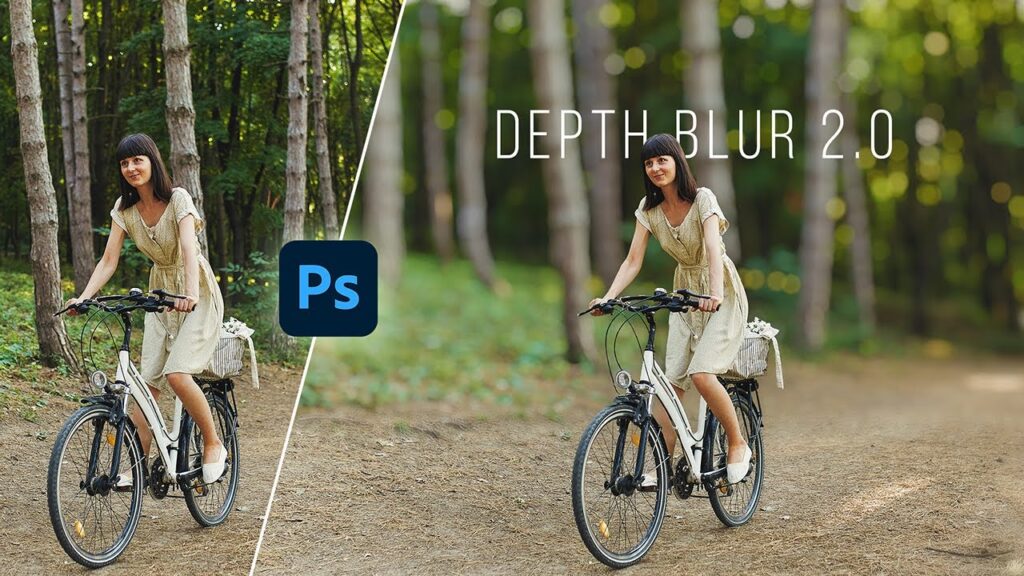
Depth blur, often referred to as depth of field (DoF) in photography, is a technique used to create a sense of depth by blurring parts of a scene that are not the focal point. In 3D design, this is achieved by manipulating the focus of the camera used to render the scene. By selectively blurring certain areas, designers can direct the viewer’s attention to the subject of the composition, adding a layer of realism and artistic flair.
The Importance of Depth Blur
The human eye naturally focuses on a specific point, with peripheral vision becoming less sharp. This is why depth blur is so effective; it mimics the way we see the world. By incorporating depth blur into your 3D designs, you can create more lifelike and engaging visuals. This technique is particularly useful in animations, architectural visualizations, and any scenario where you want to highlight specific elements of a scene.
Enhancing Realism
Depth blur adds a sense of realism to 3D designs by replicating the optical phenomena we experience in the real world. This can be particularly impactful when creating simulations or visualizations that aim to closely mirror real-life environments.
Guiding Viewer Focus
By blurring elements outside the focal range, designers can guide the viewer’s eye to the most important parts of the composition. This is especially useful in storytelling within animations and films, where strategic focus can enhance narrative elements.
Techniques for Creating Depth Blur
Achieving the perfect depth blur in 3D design requires a combination of technical skills and artistic vision. Here are some techniques and tips that can help you master this effect.
Camera Settings
The camera settings in your 3D software play a crucial role in achieving depth blur. Adjust settings such as the focal length, aperture, and focus distance to control the amount of blur and the depth of field. A wider aperture will result in a shallower depth of field, thus increasing the blur in areas that are out of focus.
Post-Processing Techniques
Many 3D software packages offer post-processing tools that allow you to refine depth blur effects. These tools can be used to adjust the intensity and spread of the blur, ensuring that it complements the overall composition without overpowering it.
Layered Compositing
For more control over the depth blur effect, consider using layered compositing techniques. Render different elements of your scene separately and apply depth blur selectively during the compositing phase. This allows for greater flexibility and precision in achieving the desired effect.
Software Tools for Depth Blur Editing
Several 3D software tools excel in providing options for depth blur editing. Here, we explore some popular choices and their features.
Autodesk Maya
Autodesk Maya offers a robust set of tools for depth blur editing, including customizable camera settings and advanced rendering options. Its integration with Arnold Renderer provides high-quality depth of field effects, making it a favorite among professionals.
Blender
Blender, being open-source, is a versatile tool that includes a powerful compositing engine. Its depth of field feature is highly customizable, allowing for intricate adjustments to achieve the perfect blur. The community support and numerous tutorials make it accessible for both beginners and experts.
Cinema 4D
Cinema 4D stands out for its intuitive interface and ease of use. Its depth blur capabilities are seamlessly integrated, allowing for real-time adjustments and quick iterations. This makes it a preferred choice for designers who prioritize workflow efficiency.
Practical Applications of Depth Blur
Depth blur is not only about aesthetics; it has practical applications across various industries.
Architectural Visualization
In architectural visualization, depth blur can enhance the realism of building renders, making them more appealing to clients. It helps in creating a focus on key architectural elements while maintaining a natural look.
Product Design
For product designers, depth blur can be used to highlight specific features of a product, thus providing a clear and focused visual presentation. This is particularly beneficial in advertising and promotional materials.
Animation and Film
In animation and film, depth blur is essential for storytelling. By controlling the focus, directors and animators can guide the audience’s attention and enhance the emotional impact of a scene.
Challenges and Solutions in Depth Blur Editing
While depth blur can significantly enhance a 3D design, it also comes with its set of challenges.
Performance Impact
Depth blur, especially in complex scenes, can be computationally expensive and may impact rendering times. To mitigate this, optimize your scene by reducing polygon count where possible and utilizing efficient rendering techniques.
Overuse of Blur
One common mistake is the overuse of blur, which can lead to a loss of detail and clarity in the design. Use depth blur judiciously to ensure it enhances rather than detracts from the composition.
Conclusion
Mastering depth blur editing in 3D design can transform your work, adding a level of sophistication and realism that captivates viewers. By understanding the principles, techniques, and tools available, you can harness the power of depth blur to create stunning visual narratives. Whether you’re an architect, product designer, or animator, depth blur offers a versatile toolset that can elevate your designs to new heights.