Top 3D Editing Software for Unmatched Creative Control
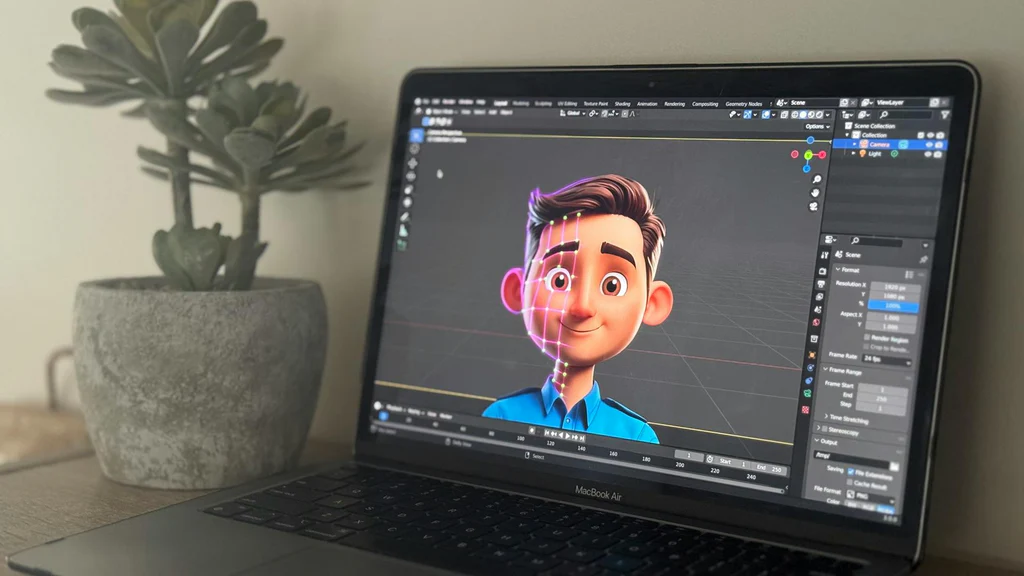
In the ever-evolving world of digital art and design, 3D editing software serves as a cornerstone for artists, designers, and creators seeking to bring their visions to life. Whether you’re crafting animations, designing video game environments, or developing intricate architectural models, the right 3D editing software provides unmatched creative control. This article explores some of the top 3D editing software available today, highlighting their features, strengths, and ideal use cases.
### Blender
Blender is arguably one of the most popular and versatile 3D editing software tools available today. It is an open-source program, which means it is free to use, and its development is driven by a vibrant community of artists and developers. Despite being free, Blender offers a comprehensive suite of features that rival even the most expensive commercial software.
#### Features and Strengths
1. **Modeling and Sculpting**: Blender offers a robust set of modeling tools, including advanced sculpting capabilities comparable to dedicated sculpting software. With tools like dynamic topology and various brushes, artists can create highly detailed models.
2. **Animation and Rigging**: Blender includes a powerful animation system that supports everything from simple keyframing to complex character animations. Its rigging tools are sophisticated, allowing for the creation of intricate skeletons and control systems.
3. **Rendering**: The software features two rendering engines: Cycles, a ray-trace based production render engine, and Eevee, a real-time render engine. Both engines provide stunning visual results, with Cycles focusing on photorealism and Eevee on speed.
4. **Customizability and Scripting**: Blender’s architecture allows for customization and expansion through Python scripting. Users can create custom tools and add-ons to enhance their workflow.
#### Ideal Use Cases
Blender is ideal for independent artists, small studios, and educational institutions due to its cost-effectiveness and versatile toolset. It’s well-suited for projects ranging from animated films to video game development.
### Autodesk Maya
Autodesk Maya is a powerhouse in the 3D editing software industry, renowned for its robust features and widespread use in Hollywood and gaming studios. Maya is a comprehensive solution for modeling, animation, simulation, and rendering, making it a favorite among professionals.
#### Features and Strengths
1. **Advanced Modeling Tools**: Maya provides an extensive array of modeling tools, including NURBS modeling, polygonal modeling, and subdivision surfaces. Its precision and flexibility make it suitable for creating complex and detailed models.
2. **Animation Capabilities**: Maya excels in animation, offering sophisticated tools for rigging, skinning, and keyframe animation. Its animation layers and graph editor provide animators with granular control over their work.
3. **Simulation**: With features like Bifrost for fluid simulation and nCloth for fabric simulation, Maya allows artists to create realistic and dynamic simulations that enhance the realism of their projects.
4. **Rendering**: Maya integrates with Arnold, a high-quality rendering engine, offering artists a powerful tool for producing stunning visuals with advanced lighting and shading techniques.
#### Ideal Use Cases
Maya is best suited for large studios and professionals working on high-budget projects that require advanced animation and simulation capabilities. Its comprehensive feature set is ideal for film production, video game development, and virtual reality experiences.
### Cinema 4D
Cinema 4D, developed by Maxon, is a user-friendly 3D software known for its intuitive interface and powerful motion graphics capabilities. It’s a preferred choice for designers and artists involved in broadcast graphics, advertising, and visualization.
#### Features and Strengths
1. **Ease of Use**: Cinema 4D is celebrated for its easy learning curve, making it accessible to beginners while still offering advanced features for experienced users. Its interface is clean and logically organized.
2. **Motion Graphics**: The software’s MoGraph toolset is a standout feature, providing tools for creating complex motion graphics and procedural animations with ease. This makes it an essential tool for designers working in advertising and broadcast media.
3. **Integration and Compatibility**: Cinema 4D integrates seamlessly with Adobe After Effects, allowing artists to incorporate 3D elements into their 2D compositions. This integration streamlines the workflow for motion graphics artists.
4. **Rendering**: With the inclusion of the Redshift render engine, Cinema 4D provides fast and photorealistic rendering, making it suitable for producing high-quality visuals in a fraction of the time.
#### Ideal Use Cases
Cinema 4D is perfect for motion graphics artists, advertising agencies, and designers who need to create visually stunning graphics for broadcast and web. Its ease of use and powerful tools make it suitable for both freelancers and studios.
### Houdini
Houdini, developed by SideFX, is a unique 3D software known for its procedural generation capabilities. It stands out for its node-based workflow, which allows artists to create complex simulations and effects with unparalleled flexibility.
#### Features and Strengths
1. **Procedural Workflows**: Houdini’s node-based approach enables artists to build complex systems and effects procedurally. This flexibility allows for non-destructive editing and easy iteration.
2. **Simulation and Effects**: Houdini is renowned for its simulation capabilities, including particle effects, fluid dynamics, and destruction simulations. Its powerful tools are used extensively in visual effects for film and television.
3. **VEX and VOPs**: Houdini offers a scripting environment with VEX (Vector Expression Language) and a visual programming interface with VOPs (VEX Operators). These tools allow for custom shader creation and procedural modeling.
4. **Rendering**: Houdini’s integration with the Mantra and Karma rendering engines provides artists with the tools needed to create photorealistic images and animations.
#### Ideal Use Cases
Houdini is the go-to choice for visual effects artists and studios working on complex simulations and procedural modeling. It’s widely used in the film industry for creating realistic effects and is ideal for projects that require intricate visual complexity.
### ZBrush
ZBrush, developed by Pixologic, is a revolutionary sculpting software that has transformed the way artists create digital sculptures and models. It offers a unique set of tools that provide artists with exceptional creative control over their work.
#### Features and Strengths
1. **Digital Sculpting**: ZBrush’s sculpting tools are unparalleled, offering a clay-like experience that allows artists to create highly detailed models with millions of polygons. Its DynaMesh feature allows for dynamic topology, enabling continuous sculpting without worrying about topology.
2. **Polypaint and Texturing**: The software allows artists to paint directly on the surface of models using its Polypaint feature. This capability, combined with its texturing tools, makes ZBrush a powerful tool for character and asset creation.
3. **ZRemesher and Topology Tools**: ZBrush offers advanced retopology tools, including ZRemesher, which automatically creates clean and manageable topology for models, essential for animation and game design.
4. **Integration**: ZBrush integrates well with other 3D software, allowing artists to incorporate ZBrush-created assets into their workflows seamlessly.
#### Ideal Use Cases
ZBrush is ideal for character artists, modelers, and sculptors working in film, game design, and concept art. Its sculpting capabilities make it the preferred choice for creating high-detail characters and creatures.
### Conclusion
The world of 3D editing software is vast and varied, offering tools tailored to different aspects of 3D creation. Whether you’re a beginner looking for a versatile tool like Blender, a professional animator utilizing Maya’s advanced capabilities, or a motion graphics artist leveraging Cinema 4D’s intuitive interface, there’s a software solution that fits your needs.
Houdini’s procedural approach and ZBrush’s sculpting prowess further expand the possibilities for artists pushing the boundaries of what’s possible in 3D design. Each of these tools provides unmatched creative control, empowering artists to bring their most ambitious visions to life. As technology continues to advance, these software options will undoubtedly evolve, offering even more opportunities for creativity and innovation in the digital realm.







Post Comment